错误集锦
Error:null value in entry: incrementalFolder=null
removing the .gradle directory in the root project directory will fix the problem.
将project最外层的.gradle删除(应该是红色的那个)。重新编译一下就可以了。
Unknown run configuration type AndroidRunConfigurationType解决方案
Android studio 运行之前的项目的时候发现在运行的那个图标上有个问号,点击运行弹窗提示“Unknown run configuration type AndroidRunConfigurationType”,细心的朋友会发现AS在右下角有提示,意思是说AS有一些插件被禁用 解决方法:打开AndroidStudio/Preferences/plugins发现右侧的插件好多都是红颜色的,而且默认勾选,你只需要都取消掉勾选,然后都再次勾选,最后点击下方的Apply就能重启插件,这个时候AS提示需要重启,点击确定即可。
解决gradle "Error:Cause: unable to find valid certification path to requested target"
这是由于app不信任我们的证书导致https会话失败。
下载证书 Mac电脑
第一步是要下载证书
去你程序要访问的网站,按option+command+j调出开发面板选择Security,点击View certificate(chrome浏览器)
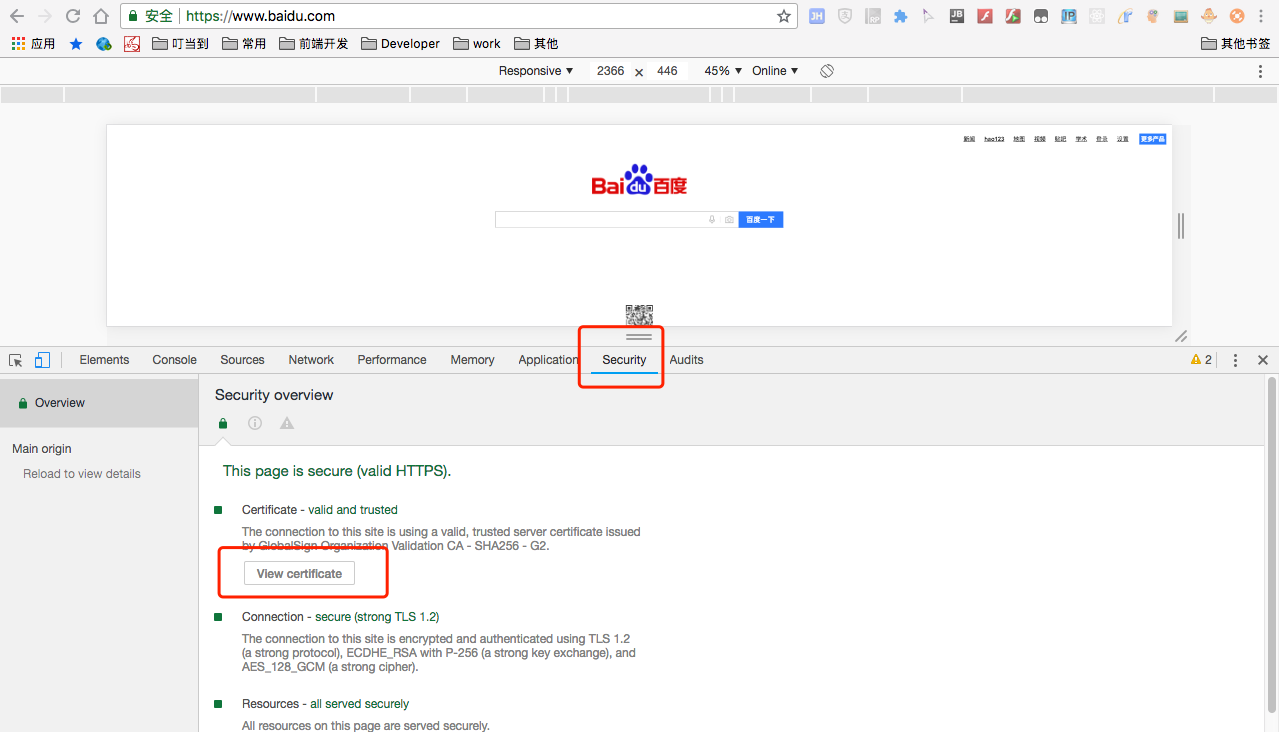

导入证书
切换到jre的/lib/security/下,我的java_home配置在~/.bash_profile里
执行命令, 如果权限不够需要添加 sudo -alias是别名的意思
keytool -import -alias github -keystore /home/rokevin/setup/jdk1.8.0/jre/lib/security/cacerts -file /Users/xxx/Desktop/www.github.com.cer
库密钥口令输入:changeit
是否信任:Y
证书导入成功后查看证书,密钥仍然是changeit
keytool -list -keystore /home/rokevin/setup/jdk1.8.0/jre/lib/security/cacerts -alias github
导入成功后如果还是不行就重启电脑:)
推送相关问题
问题
Android4.4 umeng 报错 Could not find class 'com.umeng.message.SystemReceiver', referenced from method com.umeng.message.UmengRegistrar.register 问题
Android4.4 jpush 报错 Didn't find class "cn.jpush.android.service.DownloadProvider" on path:
解决
- 在app中的build.gradle中配置
android {
    defaultConfig {
        multiDexEnabled true
    }
}
在dependencies内加入compile ‘com.android.support:multidex:1.0.3’
在Application类重写attachBaseContext方法,设置MultiDex.install(this);
@Override
protected void attachBaseContext(Context base) {
  super.attachBaseContext(base);
  MultiDex.install(this);
}
解决“Error:No toolchains found in the NDK toolchains folder for ABI with prefix: mipsel-linux-android”
https://www.jianshu.com/p/ebc7ccbdb256
WARNING: API 'variantOutput.getProcessResources()' is obsolete and has been replaced with 'variantOutput.getProcessResourcesProvider()'. It will be removed at the end of 2019.
Error: Attribute application@appComponentFactory value=(androidx.core.app.CoreComponentFactory) from
https://www.jianshu.com/p/49ff4c7c1e29
android异常 More than one file was found with OS independent path 'META-INF/XXX'
需要在app.gradle文件里面android节点下添加这样的代码
packagingOptions {
    exclude 'META-INF/NOTICE'
    exclude 'META-INF/NOTICE.txt'
    exclude 'META-INF/LICENSE'
    exclude 'META-INF/LICENSE.txt'
    exclude 'META-INF/DEPENDENCIES'
}
Error: Static interface methods are only supported starting with Android N (--min-api 24)
错误原因:这是因为java8才支持静态接口方法的原因 解决办法:可以通过在app的build.gradle文件中配置使用java8编译:
android {
  ...
  compileOptions {
    sourceCompatibility JavaVersion.VERSION_1_8
    targetCompatibility JavaVersion.VERSION_1_8
  }
}
导入三方时出现: appComponentFactory 错误
https://blog.csdn.net/qq_34224268/article/details/83861897
Android Studio 3.0中mipmap-anydpi-v26是什么
https://www.jianshu.com/p/a361e9f5d44c
依赖包重复
gradlew -q app:dependencies
图标不显示问题
https://blog.csdn.net/jiruirui213/article/details/78527676
Didn't find class "android.support.v4.content.FileProvider" on path:
https://blog.csdn.net/fox_wei_hlz/article/details/78732907?utm_source=blogxgwz1
android8.0应用崩溃,报错: Only fullscreen opaque activities can request orientation
https://blog.csdn.net/starry_eve/article/details/82777160
https://blog.csdn.net/zhuhai__yizhi/article/details/79635810
这个好使:)
https://www.jianshu.com/p/d0d907754603
More than one file was found with OS independent path 'lib/x86/libc++_shared.so'
packagingOptions {
    pickFirst 'lib/x86/libc++_shared.so'
    pickFirst 'lib/x86_64/libc++_shared.so'
    pickFirst 'lib/armeabi-v7a/libc++_shared.so'
    pickFirst 'lib/arm64-v8a/libc++_shared.so'
    pickFirst 'lib/mips64/libc++_shared.so'
    pickFirst 'lib/mips/libc++_shared.so'
}